
The Windows October 13 deadline is doing the rounds again, and this time it has perfect timing. Amazon Great Indian Festival opens on October 8, Flipkart Big Billion Days early access starts the same day, and suddenly every laptop banner, shop salesman and family WhatsApp uncle has the same line: “Windows is dying next week, buy a new laptop now.” Ruko zara. There are actually two very different October 13 stories, and only one of them needs you to do anything. Here is how to find yours in four minutes, before you spend a rupee.
Planning a sale purchase anyway? Keep our Amazon Great Indian Festival 2026 dates guide and Flipkart Big Billion Days 2026 dates explainer handy. This one asks whether you need a new PC at all.
Table of Contents
The 60-second version
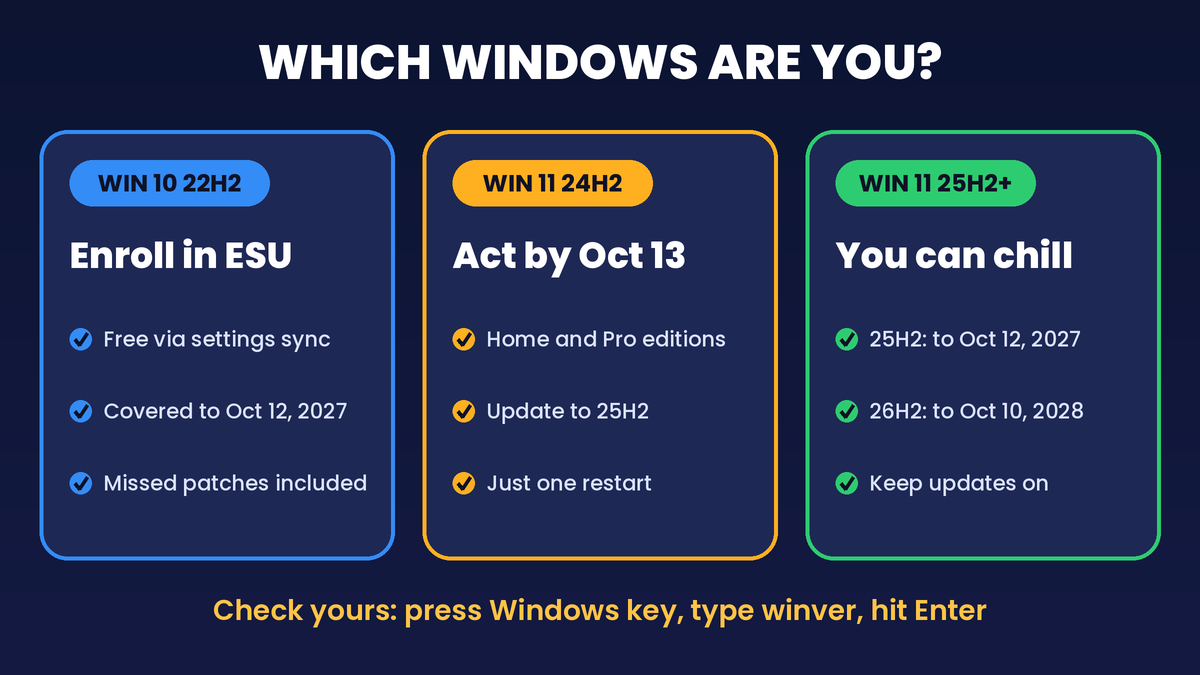
- On Windows 10? October 13 is no longer your cliff. Microsoft quietly extended free consumer Extended Security Updates (ESU) to October 12, 2027. Already enrolled? Nothing to do.
- On Windows 10 but never enrolled? Your PC has had no security patches since October 14, 2025. Enroll now. It is still allowed, and you get the missed updates too.
- On Windows 11 version 24H2 (Home or Pro)? This is the real October 13, 2026 deadline. Update to 25H2 this week.
- On Windows 11 25H2 or newer? Chill. Make chai.
Step zero: find out which Windows you actually have
Most people only know “Windows wala laptop”. Not enough here. Press the Windows key, type winver and hit Enter. A small box pops up with two things you need:
- The name: Windows 10 or Windows 11.
- The version: something like 22H2, 24H2 or 25H2.
Settings, then System, then About shows the same. Note it down and jump to your path.
Path A: Windows 10 22H2 users, tension mat lo (but enroll)
Windows 10 support officially ended on October 14, 2025. Microsoft’s bridge for home users was ESU, which keeps sending critical and important security fixes, originally for one year ending in October 2026. Then, on June 25, 2026, Microsoft edited its ESU page and added an editor’s note to its old blog post: personal devices now get coverage through October 12, 2027. No launch event. Bas, a webpage edit.
So the forward saying your Windows 10 laptop goes unsafe on October 13 is out of date. Enrolled last year? Coverage simply rolls over, no extra payment.
Not enrolled yet? Read this twice
If you never enrolled, your PC has been running without Windows security updates for almost a year. The good news is that enrollment stays open until the programme ends, and once you join, Windows Update delivers every critical and important fix released since October 2025. Microsoft offers three ways in:
- Free, if you sync your PC settings to a Microsoft account (Windows Backup).
- 1,000 Microsoft Rewards points, if you have them lying around.
- A one-time purchase of USD 30 or the local currency equivalent, plus tax.
One licence covers up to 10 PCs on the same Microsoft account, so the whole family’s old laptops can ride on one enrollment. Once any user on a PC enrolls, every other user on that PC is covered too.
The checklist before the Enroll button shows up
- Windows 10 version 22H2, in Home, Pro, Pro Education or Workstations edition.
- All the latest Windows updates installed, including the ESU licensing preparation package Microsoft lists as KB5126256.
- An administrator account signed in with a Microsoft account (child accounts do not qualify).
- Not an office-managed machine: PCs joined to a company domain, enrolled in device management or running in kiosk mode are excluded.
Then go to Settings, Update and Security, Windows Update, and tap Enroll now. Signed in with a local account? Windows will ask you to sign in with a Microsoft account first. The same screen later shows your enrollment status, so you can confirm it worked.
What ESU does not give you
ESU is a security drip, not a second life. No new features, no general bug fixes and no technical support. It keeps the doors locked. It does not repaint the house.
Path B: Windows 11 24H2 users, this October 13 is yours
Here is the twist most forwards miss. Microsoft’s own lifecycle table says Windows 11 version 24H2 Home and Pro editions reach end of updates on October 13, 2026. After that, those PCs stop getting monthly security updates, known-issue fixes, time zone updates and technical support. Any laptop that came with 24H2 and never took a feature update sits in this group.
The fix is painless. Windows 11 24H2 and 25H2 share the same core system files, so 25H2 arrives as a small enablement package that needs just one restart. Not a weekend project.
- Open Settings, then Windows Update, and tap Check for updates.
- If your PC is ready, you will see Download and install Windows 11, version 25H2.
- Home and Pro PCs not managed by an office IT team get 25H2 automatically anyway. You can pick the restart time or postpone it, but please do not postpone it past October 13.
- After restarting, run winver again and confirm it says 25H2.
Version 25H2 is supported for Home and Pro until October 12, 2027. Microsoft also made version 26H2 available on September 29, 2026, with Home and Pro support listed until October 10, 2028. Whichever one Windows Update offers you, take it.

Path C: older Windows 10 or hardware that cannot run Windows 11
If winver shows Windows 10 21H2 or older, ESU will not appear until you update to 22H2 first. If your machine is fine on 22H2 but fails the Windows 11 check, here is the minimum Microsoft lists:
- A compatible 64-bit processor, 1 GHz or faster, with 2 or more cores
- 4 GB RAM and 64 GB storage
- UEFI firmware with Secure Boot capability
- TPM version 2.0
- DirectX 12 compatible graphics with a WDDM 2.0 driver
- A 720p display larger than 9 inches
The free PC Health Check app shows which box you are failing. If it is the processor, no jugaad makes that an officially supported upgrade. For those machines, ESU until October 2027 is your honest runway. Use it to save up properly instead of panic-buying in a sale window.
What keeps updating on Windows 10 anyway
Some of your apps get a longer leash than Windows itself:
- Microsoft 365 apps (Word, Excel and friends) get security updates on Windows 10 until October 10, 2028. New features stop at version 2608.
- OneDrive on Windows 10 22H2 keeps getting updates until October 10, 2028.
- Microsoft Edge and WebView2 keep updating on Windows 10 22H2 until at least October 2028, with or without ESU.
The CyberIntro take: an updated browser on an unpatched operating system is like a new lock on a door with a broken frame. App updates do not fix holes in Windows. If you are on Windows 10, ESU is the non-negotiable bit.
The sale question: should a deadline decide your laptop?
Our rule for this festive week: let your needs decide the laptop, not a calendar forward.
Buy in the sale if
- Your PC fails the Windows 11 check and it already feels slow for your daily work or college.
- You were planning an upgrade within a year anyway, and the sale price beats what you have been tracking.
Skip or wait if
- Your PC is Windows 11 capable. The upgrade is free; take it and keep your money.
- Your Windows 10 PC runs fine and you can enroll in ESU. You have until October 2027 to shop calmly.
Decode the “AI PC” sticker
Sale listings will throw “AI laptop” at everything. For Microsoft’s own Copilot+ PC label, a laptop needs an NPU rated at 40+ TOPS, at least 16 GB of DDR5 or LPDDR5 RAM, and at least 256 GB of SSD or UFS storage. Microsoft currently names AMD Ryzen AI 300 and 400 series, Intel Core Ultra 200V and 300V series, and Snapdragon X series chips. A laptop with an NPU but only 8 GB RAM is not a Copilot+ PC, whatever the banner says.
Day-one setup for a new laptop
- Run winver on day one. If it says 24H2, update before October 13.
- Run Windows Update until it says you are up to date. Boxed stock can be months behind.
- Buy from the official app only, and do the checks in our festive sale scam safety setup before checkout.
Final Thought
The Windows October 13 deadline is real, just not for the people being scared by it. Windows 10 users get a free extra year if they enroll, Windows 11 24H2 users need one quick restart, and everyone else can go back to scrolling deals. Spend four minutes on winver tonight. If a new laptop still makes sense after that, buy it because you need it, not because a forward said so. That is the real value ki dukan.