Gadgets
Asus Zenbook 14 India: Snapdragon, AMD or Intel, Which One to Buy?
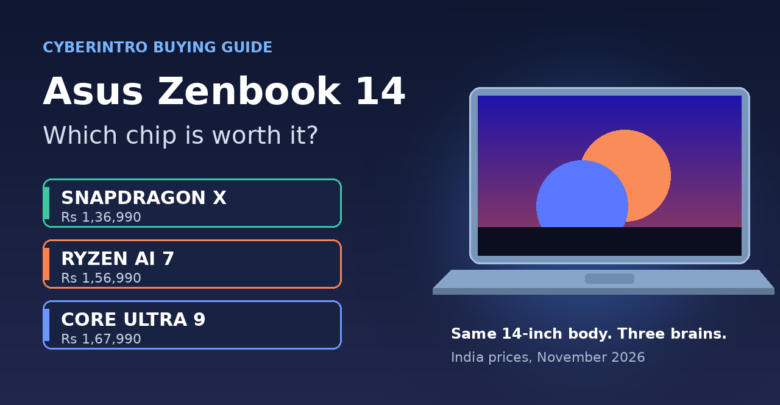
The new Asus Zenbook 14 India lineup has a twist that most laptop launches do not: it is the same slim 14-inch machine sold with three completely different brains. You can pick a Qualcomm Snapdragon X, an AMD Ryzen AI 7 or an Intel Core Ultra 9, and the price swings by Rs 31,000 depending on which badge you choose. That is not small change. So instead of another spec dump, let us figure out which one actually deserves your money, and which one you are only buying because the number on the box sounds bigger.
Table of Contents
Three chips, one body: the price ladder
Asus launched the 2026 Zenbook 14 (model family UX3480) in India in the first week of November. It is sold through Asus Exclusive Stores, the Asus eShop, Amazon, Croma, Reliance Digital and Vijay Sales. Here are the three India configurations, cheapest first:
- UX3480QA (Snapdragon X X1-26-100): Rs 1,36,990. Eight cores, NPU rated up to 45 TOPS, 14-inch FHD+ OLED at 60Hz, 50Wh battery, about 1.1 kg
- UX3480KA (AMD Ryzen AI 7 345): Rs 1,56,990. Six cores and 12 threads, NPU up to 50 TOPS, FHD+ OLED touchscreen at 60Hz with stylus support, about 1.3 kg
- UX3480AA (Intel Core Ultra 9 386H): Rs 1,67,990. Up to 16 cores, NPU up to 50 TOPS, 3K (2880 x 1800) Lumina OLED touchscreen at 120Hz with up to 1,100 nits HDR peak, 70Wh battery, about 1.3 kg
Common to all three: 16GB LPDDR5X memory soldered on board, a 512GB PCIe 4.0 SSD, Windows 11 Home, Microsoft Office Home 2024, a 68W USB-C charger and the Ceraluminum body that Asus says passed MIL-STD-810H durability tests. Colours are Arctic Blue, Komodo Coral and Zabriskie Beige. Asus quotes up to 33 hours of battery life, but that is a best-case number for the most efficient configuration, not a promise for every variant.
One honest flag: launch reports disagree on the AMD model’s battery. Some list it at 50Wh, others at 70Wh, and Asus sells both sizes globally. Check the spec label on the exact listing before you pay. We will update this if Asus India clarifies.
What the extra Rs 20,000 and Rs 31,000 actually buy
Do the subtraction and the story gets clearer. Going from Snapdragon to AMD costs Rs 20,000. For that you get a touchscreen with pen support, Bluetooth 5.4 instead of 5.3, a USB4 port, and the comfort of a regular x86 Windows laptop where nearly every app and driver simply works. You give up some weight advantage, since the AMD version is roughly 200 g heavier.
Going from AMD to Intel costs another Rs 11,000. That money is mostly the screen. The Intel model is the only one with the 3K 120Hz panel, and on a 14-inch OLED that difference is very visible: sharper text, smoother scrolling and more HDR punch. You also get a Thunderbolt 4 port and a confirmed 70Wh battery. The Core Ultra 9 chip itself is the most powerful of the three on paper, but most people writing emails and attending Teams calls will never push it hard.
So the real question is not “which chip is fastest”. It is “which upgrades do I actually use every day”.
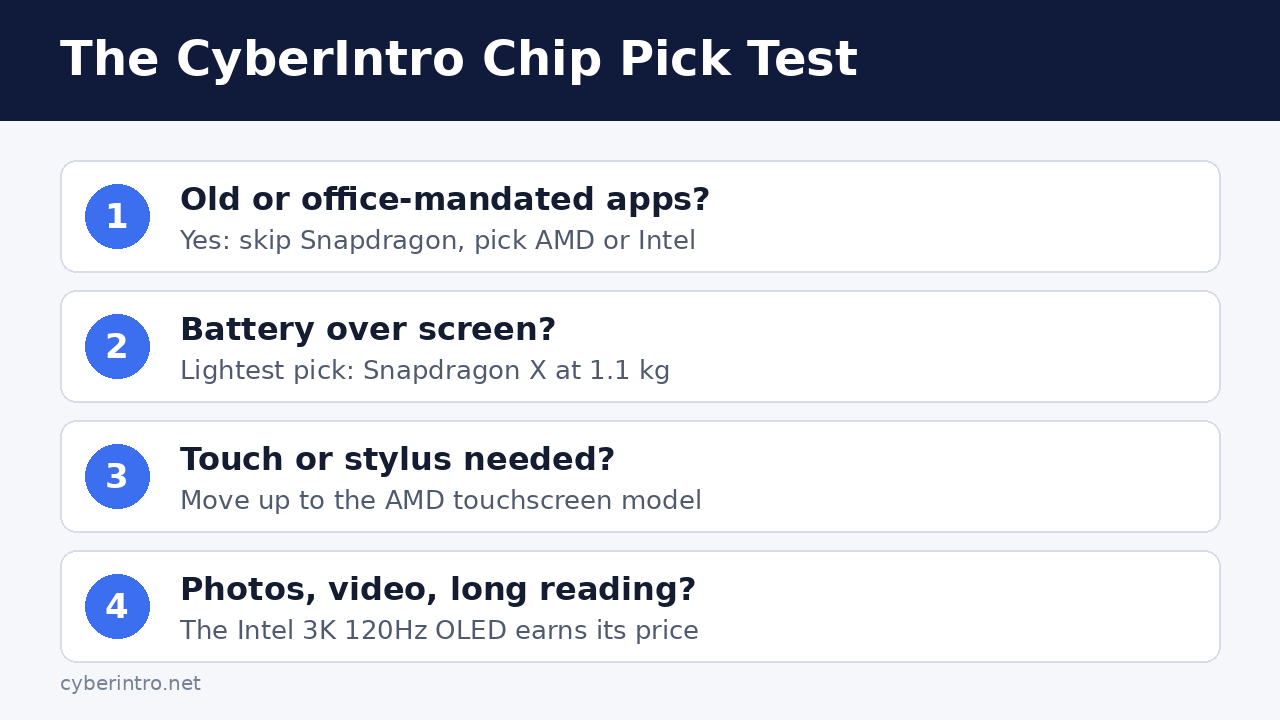
The CyberIntro Chip Pick Test
Answer these four questions honestly. Do not cheat, nobody is watching except your bank balance.
1. Do you rely on any old, niche or office-mandated software?
The Snapdragon model runs Windows on Arm. Microsoft’s app translation has improved a lot, and mainstream apps like browsers, Office and most creative tools run fine. But some older printer and scanner drivers, certain VPN clients your company IT pushes, college lab software and games with strict anti-cheat can still be fussy or refuse to run. If even one must-have app is in that list, skip Snapdragon and go AMD or Intel. If your life is Chrome, Office and WhatsApp Web, Snapdragon is a perfectly sensible pick.
2. Is battery life more important than screen quality?
Arm chips are known for sipping power on light work, which is the Snapdragon model’s strongest argument, though its battery is the smaller 50Wh pack. The Intel model has the bigger 70Wh battery but also a high-resolution 120Hz panel to feed. Until independent battery tests of the India units are out, treat the 33-hour claim with a pinch of chaat masala. If you spend full days on trains, in college or at client sites without a socket, the lighter Snapdragon at 1.1 kg is very tempting.
3. Will you touch the screen or use a pen?
The Snapdragon configuration is listed without touch in the launch specs. If you sign PDFs, annotate notes or sketch, that alone pushes you up to AMD, which also adds stylus support. If you have never once poked your current laptop screen, ignore this upgrade.
4. Do you edit photos, watch a lot of video or stare at text for ten hours?
This is where the Intel model earns its premium. The 3K 120Hz OLED is the one feature in this lineup you notice every single minute the lid is open. Creators, coders and binge-watchers will feel it. Office users who mostly live in spreadsheets will not miss it much.
Our pick for each kind of buyer
- Students and light office users: Snapdragon X at Rs 1,36,990, provided Question 1 is a clean no. Lightest, cheapest, and the most paisa vasool of the three for basic work
- The safe all-rounder: AMD Ryzen AI 7 at Rs 1,56,990. Full app compatibility, touch and pen, USB4. Just confirm which battery size the listing has
- Creators and screen snobs: Intel Core Ultra 9 at Rs 1,67,990. If you are already stretching to Rs 1.57 lakh, the extra Rs 11,000 for the 3K 120Hz panel and bigger battery is the easiest upgrade to justify
- Gamers: none of these. They use integrated graphics. A dedicated gaming laptop, or cloud gaming as we explained in our GeForce Now 4-month plan guide, makes more sense
Also remember that 16GB is the ceiling here because memory is soldered. It is fine for most people today, but heavy multitaskers who keep 40 Chrome tabs and a VM open should know there is no upgrade path later.
Before you click buy: price and timing checks
At Rs 1.37 lakh and up, the Zenbook 14 is shopping in the same neighbourhood as Apple’s laptops. If you are torn between Windows and macOS, read our MacBook buy-now-or-wait guide before deciding. A few practical tips:
- Compare effective prices, not MRPs. Asus is advertising no-cost and low-cost EMI options, and card offers differ between Amazon, Croma and the Asus store. Note down the final payable amount on each
- Read the exact model code. QA is Snapdragon, KA is AMD, AA is Intel. Third-party sellers sometimes mix up listing photos and specs
- Check the box contents. Asus says included accessories vary by country, so do not assume a sleeve or mouse comes free. The new ZenMouse MD202 is sold separately at Rs 6,999
- Activate Office promptly. The bundled Office Home 2024 is a real saving, but bundled software often has an activation window, so set it up in the first week
Final Thought
The Asus Zenbook 14 is a rare laptop where the cheapest version might be the smartest one, as long as your software plays nice with Arm. If it does not, the AMD model is the no-drama middle path. And if you already care about screens, the Intel model’s 3K 120Hz OLED is the upgrade you will actually see every day. Run the Chip Pick Test, buy the laptop that matches how you work, and leave the bragging rights about core counts to the spec sheet.