Latest News
WhatsApp Bill Payment India: FASTag & Utility How-To
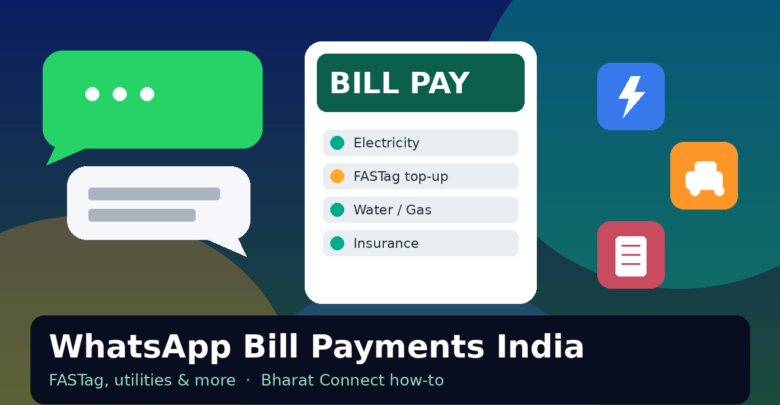
If your phone already lives inside WhatsApp chats, Meta just gave that habit a bigger job. WhatsApp bill payment India support is rolling out through Bharat Connect (the BBPS network), so you can fetch and clear everyday bills without bouncing between three payment apps and a forgotten email reminder.
This is not another launch-day rewrite. Below is a practical CyberIntro walkthrough: what you can pay, how to find the rupee icon flow, when it actually beats your bank UPI app, and the safety checks that keep bill wala tension away.
Table of Contents
What launched (and what is verified)
On 3 September 2026, WhatsApp announced bill payments for India users. Official Meta notes say the feature is powered by Bharat Connect and lists access to 22,722 billers across 30 categories. Named examples include electricity, gas, water, FASTag, insurance, credit card and loan repayments.
Payments can use UPI, debit card or credit card. The rollout is gradual on Android and iOS — Meta says it reaches users over the coming weeks. So if you do not see the rupee icon yet, that is expected, not a bug in your brain.
WhatsApp already had prepaid recharges and other in-app utilities earlier; this bill-pay layer is the household-recurring piece sitting on India’s shared BBPS rails.
What you can pay on WhatsApp
Stick to what Meta has clearly listed. Inside bill payments you should expect categories such as:
- Electricity
- Piped gas
- Water
- FASTag
- Insurance premiums
- Credit card bills
- Loan repayments
- Other household / utility categories surfaced under the 30-category Bharat Connect map
Handy extras called out in the official post:
- Pre-fetched bills and a Payments Home view of past payments and upcoming dues
- Multiple accounts under one biller (home, office, family)
- Popular categories up front, with See All for the longer list
- One-tap return to billers you already paid once on WhatsApp
If a specific biller is missing for your city disccom or FASTag issuer, that is a Bharat Connect coverage question — not something WhatsApp invents on the spot.
Step-by-step: how to use WhatsApp bill payments
Meta’s own flow is short. Once the feature is on your account:
- Open WhatsApp and tap the ₹ icon at the top of the home screen.
- Pick the bill category and then your biller.
- Add and confirm account / customer details carefully.
- Review the fetched bill amount and the details on screen.
- Choose UPI, debit card or credit card.
- Confirm the payment and keep the in-app receipt trail.
First-time tip: enter the customer ID / FASTag ID / policy number exactly as your paper bill shows. One wrong digit and Bharat Connect will either fetch nothing or (worse) someone else’s dues — always match name and amount before you hit pay.
After one successful payment, that biller should sit on Payments Home for faster repeats. That is the whole point of paisa bachao on recurring stuff: less hunting, more one-tap.
CyberIntro checklist: should you use it?
Use WhatsApp bill pay when:
- You already open WhatsApp more than GPay / PhonePe / bank apps
- You want one place to glance at upcoming household dues
- You manage multiple meters / FASTags / family accounts under the same biller
- You are fine paying with UPI or cards from inside chat
Stick to your bank or dedicated UPI app when:
- You need a specific card offer / cashback that only fires inside that app’s bill section
- You rely on autopay mandates already set elsewhere and do not want two systems fighting
- The WhatsApp ₹ icon has not reached your number yet (gradual rollout)
- You prefer a payment app with deeper dispute tooling you already know how to use
Festive season shopping is a separate circus — if you are also timing Flipkart wishlist buys, keep our Flipkart Big Billion Days 2026 dates note handy so bill day and sale day do not collide in the same chaotic evening.
Safety tips before you pay
Bill payments are convenient. Fraudsters love convenience. Quick hygiene:
- Confirm the biller name and account identifier match your official bill — do not trust random forwards that ask you to “verify FASTag on WhatsApp” via a link
- Read the fetched amount once more; if it looks wild, stop and check the utility’s own site or SMS
- Never share OTP, UPI PIN or card CVV in a chat, even if someone claims to be “WhatsApp support”
- Prefer official in-app ₹ flow, not third-party bots or unknown business accounts pitching “bill help”
- Keep screenshots / payment references until the biller shows paid status
- For FASTag, double-check the vehicle / tag ID so you are not topping up a stranger’s lane money
Bharat Connect is regulated bill infrastructure; WhatsApp is the front door. Treat the door like any other payment app — calm fingers, no rush.
Quick facts (from Meta’s India announcement)
- Announced: 3 September 2026
- Network: Bharat Connect (BBPS)
- Scale cited: 22,722 billers, 30 categories
- Examples: electricity, gas, water, FASTag, insurance, credit card, loans
- Entry point: ₹ icon on WhatsApp home
- Payment modes: UPI, debit card, credit card
- Platforms: Android and iOS (phased rollout)
- Extras: past payments, upcoming bills, multi-account per biller, Payments Home shortcuts
Final Thought
WhatsApp bill payment India is less about a shiny new brand war and more about reducing app-hopping for boring-but-important dues. If the rupee icon is live on your phone, try one low-risk bill first — electricity or FASTag — and see if Payments Home actually saves you time. If it is not there yet, keep your existing UPI habit; the feature is rolling out in waves, not overnight magic.
Convenience is great. Confirming the biller twice is still cooler.